
On this page
- At a glance
- When a local messaging backup is useful
- Compare the options
- Meshtastic: a separate radio node for each participant
- Briar: Android messaging with nearby sync
- Bitchat: Bluetooth mesh plus optional internet features
- Keep ordinary calls, radio and paper in the plan
- Meshtastic devices to compare
- Set up the household before you need it
- Common questions
- Related guides
- Sources
Some links in this guide are affiliate links. As an Amazon Associate I earn from qualifying purchases. Read our affiliate disclosure.
When phone coverage is weak or the internet is down, some groups can still exchange short messages over a nearby radio link. That only works when the people you need to reach have set up compatible equipment and are close enough to connect, directly or through other users' devices.
Use a normal phone call or text first, including for 999. Meshtastic, Briar and Bitchat cannot call emergency services and are not a replacement for ordinary communications. Agree a paper meeting point and contact plan as well.
When a local messaging backup is useful
A local messaging tool can help a household agree who is collecting a child, check that a nearby relative has arrived or coordinate at a campsite when mobile service is unreliable. It may also help on a rural walk where members of a group are close but cannot hear one another.
It is not a way to contact anyone who has not installed the same tool, and it does not create emergency-service coverage. If a message does not arrive, fall back to the time, meeting place and trusted contacts you agreed in advance. For broader household planning, start with our UK emergency radio and communications guide.
Compare the options
| Option | What you need | Offline link | Both ends equipped? | Typical reach | UK radio rules | Useful for | Can reach 999? |
|---|---|---|---|---|---|---|---|
| Meshtastic | 868 MHz LoRa device and phone, unless the device has a screen | LoRa mesh set to EU_868 | Yes, both ends need a node | Varies with height, terrain, buildings and other nodes | Licence-exempt within Ofcom IR2030/1/19 limits when set to EU_868 | Planned household or group messaging, walks and rural use | No |
| Briar | Android phones with Briar installed and contacts added | Bluetooth or Wi-Fi nearby; internet syncing is separate, according to the Briar Project | Yes, both ends need Briar and must be contacts | Nearby; the Briar Project describes Bluetooth or Wi-Fi sync | Not applicable; uses phone radios | Android-only messaging for added contacts | No |
| Bitchat | iPhone or Android phones with Bitchat installed | Local Bluetooth mesh; internet mode uses Nostr relays | Yes, both ends need Bitchat | Nearby, with relays from other users; no distance promise | Not applicable; local link uses Bluetooth | Quick local messaging when other users are close | No |
| PMR446 radio | Two compliant PMR446 handsets | Voice radio | Yes, both ends need a handset | Local; test in the places you expect to use it | Licence-exempt only with compliant equipment and use | Simple short local voice conversations | No |
| Normal calls and SMS | Phone and a working mobile or landline service | Needs a working network | No, only the caller needs a phone | National where the network is available | Not applicable | Everyday communication, including calling 999 | Yes, through the normal emergency calling service |
None guarantees a particular range. Meshtastic uses extra radio hardware but can pass messages between nodes when the terrain and other nodes allow it. Briar and Bitchat use phones already in the group, but their direct links depend on nearby devices. The Baofeng UV-5R guide explains why a general-purpose handheld is not the same as a compliant licence-free PMR446 radio.
Digital landlines may also stop working during a power cut if connected equipment loses power. Check the arrangements in our Digital Voice and broadband power-cut guide.
Meshtastic: a separate radio node for each participant
Meshtastic sends short messages over LoRa radio between compatible nodes. A phone usually connects to a node over Bluetooth; another node can receive the message and pass it on. It does not need mobile data for the local mesh, but it only reaches people with a node in radio range, either directly or through other nodes.
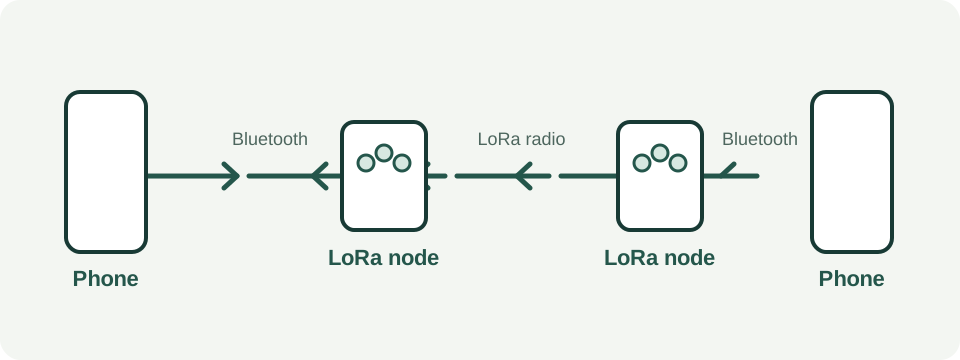
Use 868 MHz hardware and set EU_868
The Meshtastic country table lists the UK with EU_868 and points to Ofcom IR2030. Ofcom's current IR 2030, Table 3.1 row IR2030/1/19, covers 869.40–869.65 MHz at up to 500 mW e.r.p. Its access conditions require designated spectrum-access and interference-mitigation techniques or, alternatively, a duty cycle of 10% or less. The document describes these as licence-exempt short-range devices. Read the current Ofcom short-range devices guidance alongside the row.
Meshtastic's EU_868 firmware table lists a 27 dBm power ceiling and a 10% duty cycle. The firmware calculates duty cycle over a rolling hour and stops transmitting when the limit is reached. Ofcom states the radio limit in e.r.p.; 27 dBm is approximately 500 mW, but the units describe different measurements. Keep the firmware limits in place and do not enable the duty-cycle override.
Buy hardware that is explicitly the 868 MHz version and set its region to EU_868 before it transmits. Do not use a US 915 MHz device for this setup. Ofcom's row also permits airborne use, but that does not make every radio setting compliant.
Pair, configure and test the nodes
Meshtastic is manageable if you are comfortable following setup instructions, but it is not a one-tap appliance. Install the official phone app, charge the device, pair over Bluetooth and set the correct region. Create a private channel and share its QR code with the people in your group. Check position or GPS sharing before using public channels. Some boards need their firmware flashed before they can be used.
Everyone's nodes must use compatible settings to hear each other. Practise sending a short message from the places you expect to use the mesh. A device on a high, clear position may help, but no setup guarantees coverage through buildings or across a particular distance. Terrain, height, buildings and the location of other nodes all matter. In a town, indoor-to-indoor links may be short.
Default or public channels should be treated as public. Use a private channel key for a household group, and remember that radio devices can also share position. Check the device and app documentation, especially before joining a public mesh.
Briar: Android messaging with nearby sync
The Briar Project says the app does not rely on a central server. It describes direct sync over Bluetooth, Wi-Fi or memory cards when the internet is unavailable, and Tor syncing when internet access is available. Briar is available for Android through Google Play or F-Droid; there is no iPhone app.
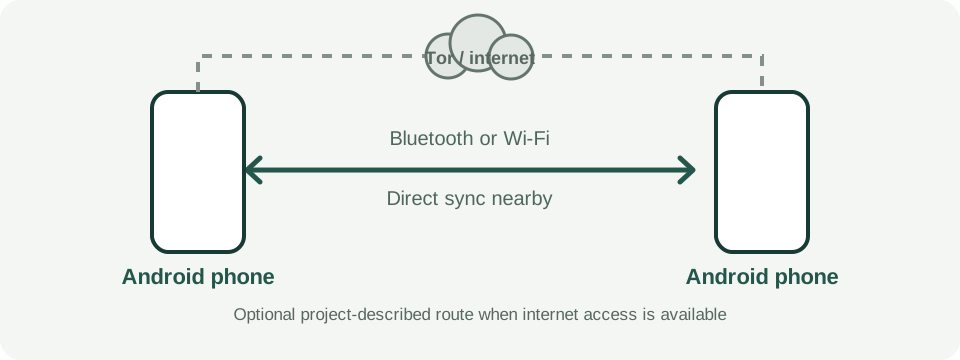
Add the people you want to contact in person before relying on Briar. The project's quick-start guide describes exchanging QR codes to add a nearby contact. A phone-to-phone connection is useful only while the devices are close enough to sync and have charge. A powered-off router does not create Wi-Fi between separated phones, and internet features need internet access.
The project's descriptions of encryption and privacy are its own claims, not an independent security assessment in this guide. Briar may suit a group that already uses Android and is willing to practise the contact setup. It will not connect to Bitchat or Meshtastic users.
Bitchat: Bluetooth mesh plus optional internet features
The Bitchat project describes two transports: a local Bluetooth mesh and internet messaging through Nostr relays. It links to iPhone and Android app stores, and says nearby phones can relay messages across multiple hops. Actual reach depends on nearby Bitchat users and the environment; do not treat a hop count as a distance promise.
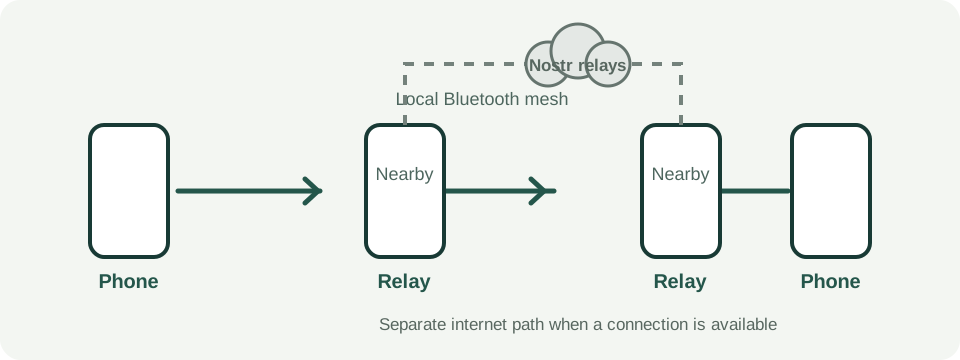
These are descriptions from the Bitchat project, not an independent security audit. Its README says the mesh uses a persistent per-device identifier that nearby radios can observe. It also says store-and-forward messages do not have forward secrecy. Treat its location channels as public and linked to a geographic area; those internet features need a connection.
Install Bitchat only from the official App Store or Play Store links or follow the project's source-verification instructions. The project warns that copies may appear when its repository or release page is unavailable. Check the latest project documentation before relying on any feature or privacy claim.
Keep ordinary calls, radio and paper in the plan
Mobile calls and texts are still the practical first choice whenever service is available, and a normal phone call is the route to 999. None of the three tools in this guide calls emergency services. The UK Emergency Alerts guide explains how official alerts reach compatible phones; a local messaging mesh does not deliver those alerts.
For a simple voice conversation between people nearby, compare compliant PMR446 radios and test them where you plan to use them. Our emergency radio equipment guide and UK radio listening guide cover other radio jobs. If you want to learn amateur radio, see the amateur radio licensing guide; licensed operation is a different subject from EU_868 household use.
For a home power cut, first establish whether it is your property or a wider outage using these household checks. The power-cut kit list and grab-bag guide cover practical equipment. For family contact arrangements, use the school and work reunification plan and agree a paper fallback with neighbours using this neighbour-planning feature.
Meshtastic devices to compare
Check the exact radio band before ordering. Each Meshtastic participant needs a compatible node. A screen-equipped node can be used without a phone for every interaction, while card-sized devices need a phone. Review whether the device has current Meshtastic firmware and set EU_868 before transmission.
868 MHz device with a screen
LILYGO T-Echo Plus 868
The supported T-Echo Plus in the White 868 MHz listing. The device has an e-paper display, battery and GNSS. The listing does not promise Meshtastic firmware, so check or flash the current firmware before use. Set EU_868 and review position sharing.
View the LILYGO T-Echo Plus on AmazonClassic cased 868 MHz device
LILYGO T-Echo 868
The supported T-Echo in the 868 MHz listing. This listing is marketed for SoftRF rather than Meshtastic, so expect to flash Meshtastic firmware before use. Confirm the exact 868 MHz version and set EU_868.
View the LILYGO T-Echo on AmazonPocket-size option, no screen
Seeed SenseCAP T1000-E
The Meshtastic hardware list names the Card Tracker T1000-E as a community favourite. It has no screen, so use the phone app for setup and messaging. Compare the exact variant and setup instructions before choosing it.
See the SenseCAP T1000-E at The Pi Hut or read Seeed's Meshtastic setup guide.
Amazon links above are affiliate links. As an Amazon Associate I earn from qualifying purchases. Read our affiliate disclosure.
Set up the household before you need it
- Choose one tool together. Everyone needs the same messaging app, or a compatible Meshtastic node.
- Install from official sources. Use the official Meshtastic app, Briar through Google Play or F-Droid, or Bitchat through its official app-store links.
- Configure Meshtastic carefully. Charge and pair each node, set EU_868, create a private channel and share its QR code. Check location settings and leave power and duty-cycle limits unchanged.
- Add Briar contacts in person. Use the project's QR contact process before you are separated.
- Test in ordinary conditions. Send a short message at home and nearby with mobile data switched off. Check what still works and agree a fallback when it does not.
- Keep the plan usable. Charge phones and nodes, keep a suitable power bank with its cable, and write down contacts and a meeting place on paper.
For power-bank selection, read our power-bank guide and browse power-bank options. A battery reserve helps only if the cable and device work together.
Common questions
Is Meshtastic legal in the UK?
Ofcom's IR 2030 Table 3.1 row IR2030/1/19 lists 869.40–869.65 MHz at up to 500 mW e.r.p., subject to the specified spectrum-access techniques or a duty cycle of 10% or less. Use 868 MHz hardware set to EU_868 and leave firmware limits alone. See Ofcom IR 2030 and Meshtastic's region-by-country table.
What does 27 dBm mean for Meshtastic?
Meshtastic lists 27 dBm as the EU_868 firmware power limit, approximately 500 mW. Ofcom states its limit in e.r.p. Do not raise the power or override the duty-cycle limit. See the Meshtastic LoRa configuration documentation.
Can I call 999 with these apps or devices?
No. They do not call 999. Use a normal phone call or text when you can, and keep a written meeting and contact plan.
Does Briar work on iPhone?
No. The Briar Project provides Briar for Android through Google Play and F-Droid. See Briar's download page.
Can Bitchat and Briar talk to each other?
No. They are separate apps and do not share a messaging network. Everyone in a group needs to use the same app.
Can these tools work during a power cut?
Their local links can work without internet if the devices are charged and within reach of the relevant radio mesh. Features that depend on internet access will not work offline.
How far does Meshtastic go?
There is no reliable distance promise for every place. Height, terrain, buildings and other nodes affect whether a message gets through; indoor links in a town may be short.
Are messages private?
Privacy depends on the app, channel and settings. Treat public channels as public. Briar and Bitchat describe encryption features in their own project documentation; those descriptions are not an independent security audit. Bitchat's project also documents a persistent mesh identifier and store-and-forward limitations.
Is Meshtastic setup beginner-simple?
It is manageable for a careful beginner, but it is not a one-tap setup. Expect to install an app, pair a device, set EU_868, create a private channel and check position sharing. Some boards need firmware flashing.
Do I need an amateur radio licence for EU_868 Meshtastic?
Not for use as a licence-exempt short-range device within Ofcom IR 2030. Other radio modes or bands may have different rules; see our amateur radio licensing guide.
Related guides
Sources
Primary sources checked on 5 November 2026. Briar and Bitchat descriptions below are attributed to their projects.
- Ofcom: UK Interface Requirement IR 2030, Table 3.1, row IR2030/1/19, printed pages 13–14.
- Ofcom: short-range devices.
- Meshtastic: LoRa region by country.
- Meshtastic: LoRa configuration.
- Meshtastic: initial configuration.
- Meshtastic: supported hardware.
- Briar Project: how it works.
- Briar Project: quick-start guide.
- Briar Project: download.
- Bitchat Project: README and current release information.
- Seeed Studio: SenseCAP T1000-E Meshtastic setup.
- The Pi Hut: SenseCAP T1000-E product page.